Implementation of Unit Data
Behind the Scenes of a Cat-Themed RTS


2025-03-06
2025-03-06
Hi! In this blog post I'll talk about how I implemented the data for the various units in my RTS with cats!
I will explain the problems I encountered, which solution I found, and why I believe it's a great solution for my usecase.
Let's get started!
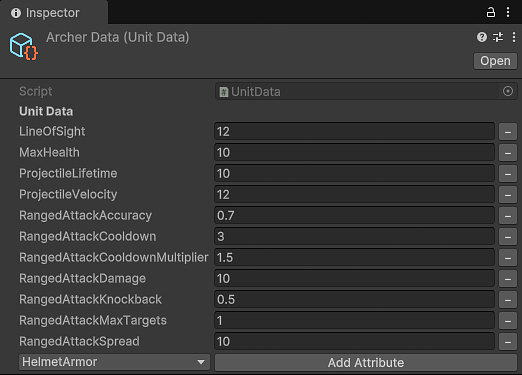
During the earliest stages of the development, I had to design a system to handle the data of the units.
After researching other games, I found two approaches to be the most commonly used:
A single class with every possible data type, for all possible variables.
The pro is that it is extremely easy to implement, and is very nice for an eventual
multiplayer addition.
The con is that it leads to wasted space for unused data, making it impossible
to catch extra parameters until runtime.
Debugging is much more complicated, and since I'm the only developer on the project
I wanted to simplify my life as much as possible.
Using individual variables for each unit type (for instance, projectile velocity for Archers and helmet armor for Axecats) means manually configuring every prefab, or making a custom ScriptableObject for each unit. Customization is absolute, but this approach makes it hard to compare similar functionalities across units, as there is no easy way to understand when two variables have the same purpose.
While neither of the approaches is bad, I wanted a solution that allows easy addition or removal of standardized data parameters, without wasting memory or complicating the debugging.
I developed a system centered on the ScriptableObject class. My class, UnitData, holds a list of UnitAttribute structures. Each attribute has two variables:
Each value is mapped to its expected C# type (int, float, or bool) using a dictionary. This design means that each object only contains the attributes the unit uses, keeping the data both compact and manageable.
On the Awake script, the unit loops over all the attributes, assigning them to the correct variable. This allows for standardized data (the types are always the same for each unit).
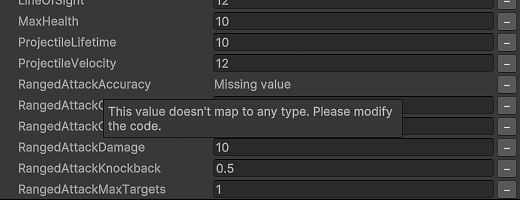
Ensuring that each attribute's value is of the correct type was essential. To solve this, I created a dictionary named dataTypeMap that maps each enum value to its expected type. This mapping is checked during serialization and at runtime. If a mismatch occurs, the system defaults to a new instance using Activator.CreateInstance(typeValue), preventing subtle bugs that could otherwise lead to endless debugging. There are also safeguards in place to prevent data corruption when the data is missing.
public static readonly Dictionary dataTypeMap = new()
{
    { MaxHealth, typeof(int) },
    { LineOfSight, typeof(int) },
    { MeleeAttackDamage, typeof(int) },
    { MeleeAttackCooldown, typeof(float) },
    { MeleeAttackCooldownMultiplier, typeof(float) },
    { MeleeAttackKnockback, typeof(float) },
    { MeleeAttackMaxTargets, typeof(int) },
    { RangedAttackDamage, typeof(int) },
    { RangedAttackCooldown, typeof(float) },
    { RangedAttackCooldownMultiplier, typeof(float) },
    { RangedAttackKnockback, typeof(float) },
    { RangedAttackMaxTargets, typeof(int) },
    { RangedAttackSpread, typeof(float) },
    { ProjectileVelocity, typeof(float) },
    { ProjectileLifetime, typeof(float) },
    { HelmetArmor, typeof(float) },
    { ShieldArmor, typeof(float) }
};
Unity's built-in serialization does not support mixed data types in a single list.
I overcame this by implementing the ISerializationCallbackReceiver interface,
which allows you to run a custom method during serialization and deserialization:
Before Unity serializes the object, I split the data attributes into separate lists for ints, floats, and bools. I also create parallel lists that record each data type as a string, for a total of 6 lists. Sorting the data first ensures consistency, and these lists help manage element removal. This is necessary, as I want to be able to change the order of the elements in the enum any time I want.
public void OnBeforeSerialize()
{
    intStringTypes.Clear();
    floatStringTypes.Clear();
    boolStringTypes.Clear();
    intData.Clear();
    floatData.Clear();
    boolData.Clear();

    OrderData();

    foreach (UnitAttribute attribute in data)
    {
        if (dataTypeMap.TryGetValue(attribute.dataType, out Type typeValue)
            && attribute.value != null)
        {
            object newValue = attribute.value.GetType() == typeValue ?
                attribute.value : Activator.CreateInstance(typeValue);
            switch (typeValue)
            {
                case Type type when type == typeof(bool):
                    boolData.Add((bool)newValue);
                    boolStringTypes.Add(attribute.dataType.ToString());
                    break;
                case Type type when type == typeof(int):
                    intData.Add((int)newValue);
                    intStringTypes.Add(attribute.dataType.ToString());
                    break;
                case Type type when type == typeof(float):
                    floatData.Add((float)newValue);
                    floatStringTypes.Add(attribute.dataType.ToString());
                    break;
                default:
                    Debug.LogError("Data type not implemented, " +
                                   "cannot serialize");
                    break;
            }
        }
    }
}
After deserialization, I reconstruct the original list of attributes by reading from the sorted lists. I check that each value's type matches the expected type from the mapping dictionary. If not, I log a warning or error and assign a default value. This two-step process makes the data robust and flexible, allowing changes over time without breaking older data.
Below is the deserialization code:
private List<UnitAttribute> DeserializeList(
    List<string> serializedTypeStrings, IList<object> serializedValues)
{
    List<UnitAttribute> unserializedAttributes = new();
    int dataIndex = 0;
    Type expectedType = serializedValues.Count > 0 ?
                        serializedValues[0]?.GetType() : null;

    if (expectedType == null)
        return unserializedAttributes;

    for (int i = 0; i < serializedTypeStrings.Count; i++)
    {
        if (!Enum.TryParse(serializedTypeStrings[i],
            out DataType serializedType))
        {
            Debug.LogWarning($"Data {serializedTypeStrings[i]} " +
                              "couldn't be parsed. " +
                              "An enum value has changed. " +
                              "This might or might not be intentional. " +
                              "No data will be added. " +
                              "To recover the lost data, " +
                              "please rollback to a previous version.");
            dataIndex++;
            continue;
        }

        if (!dataTypeMap.TryGetValue(serializedType, out Type typeValue))
        {
            Debug.LogError($"Type {serializedType} has a missing mapping. " +
                            "Data will be lost. " +
                            "Please add a mapping in the dictionary. " +
                            "To recover the lost data, " +
                            "please rollback to a previous version.");
            dataIndex++;
            continue;
        }

        UnitAttribute newAttribute = new() { dataType = serializedType };

        if (typeValue != expectedType)
        {
            Debug.LogWarning($"Type of {serializedType} was changed " +
                             $"from {expectedType} to {typeValue}. " +
                              "This might or might not be intentional. " +
                              "A default value will be assigned.");
            newAttribute.value = typeValue.IsValueType ?
                                Activator.CreateInstance(typeValue) : null;
        }
        else
        {
            newAttribute.value = serializedValues[dataIndex];
        }

        dataIndex++;
        unserializedAttributes.Add(newAttribute);
    }

    return unserializedAttributes;
}
That's how the data is handled. However, I needed a custom implementation for each unit,
and I achieved this by assigning a private variable to each attribute. I override a dictionary which maps
the attributes to the variables, and I cycle through it on the unit's initialization.
If an attribute has not been mapped, an error is logged.
If there is an extra mapping, an error is logged as well.
If the casting fails, an error will be thrown automatically.
protected Dictionary<UnitData.DataType, Action<object>> DataMappings;

protected abstract void SetDataMappings();

protected void InitializeUnitData()
{
    SetDataMappings();

    HashSet usedMappings = new();

    foreach (UnitData.UnitAttribute attribute in unitData.data)
    {
        if (!DataMappings.TryGetValue(attribute.dataType,
            out Action<object> setter))
        {
            Debug.LogError($"{attribute.dataType} does not have a mapping, " +
                            "please add one in DataMappings");
            continue;
        }

        setter(attribute.value);
        usedMappings.Add(attribute.dataType);
    }

    foreach (var mapping in DataMappings)
        if (!usedMappings.Contains(mapping.Key))
        {
            Debug.LogError($"{GetType().Name} has an unused mapping for " +
                           $"{mapping.Key}. Please remove this mapping " +
                            "or provide the corresponding Unit Data.");
        }
} protected override void SetDataMappings()
{
DataMappings = new Dictionary>
{
{ DataType.MaxHealth, value => maxLife = (int)value },
{ DataType.LineOfSight, value => lineOfSight = (int)value },
{ DataType.RangedAttackDamage, value => RangedDamage = (int)value },
{ DataType.RangedAttackCooldown, value =>
((ArcherAIComponent)AIComponent).attackCooldown = (float)value },
{ DataType.RangedAttackKnockback, value => Knockback = (float)value },
{ DataType.RangedAttackAccuracy, value =>
RangedAttackAccuracy = (int)value },
{ DataType.RangedAttackSpread, value =>
RangedAttackSpread = (int)value },
...
};
} This approach allows me to avoid errors, as it accounts for every possible combination, which makes debugging way easier.
Even with this solution, if the data is cumbersome to work with in the Unity Editor, it's going to be a problem.
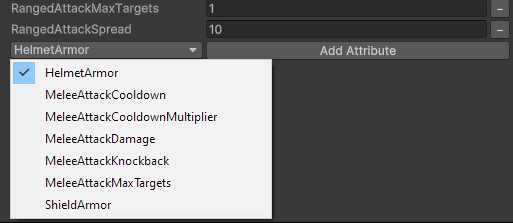
So I implemented a custom editor for the Unit Data Scriptable Object, to make managing unit attributes as painless as possible.
Here are the key points:
While my solution might seem unconventional, I think it fits its purpose really nicely. My game's core philosophy is that every unit has a unique, personal feel, so no two units are exactly alike. This approach allowed me to:
While it might not scale for every project, especially those prioritizing performance and strict adherence to OOP, it provided exactly the freedom and flexibility I needed for my game!
Hope you enjoyed this article! If you did, check out my other blog posts